
Anti-Fatigue Lenses vs Computer Glasses: What Is the Difference?
After several hours of switching between your laptop, phone and documents, your eyes may start to feel tired.
You might notice:
difficulty maintaining focus
tired or heavy eyes
headaches
temporary blur
neck or shoulder tension
That often leads to the question:
Should I get anti-fatigue lenses or computer glasses?
Although the terms are sometimes used interchangeably in eyewear marketing, they usually describe different lens strategies.
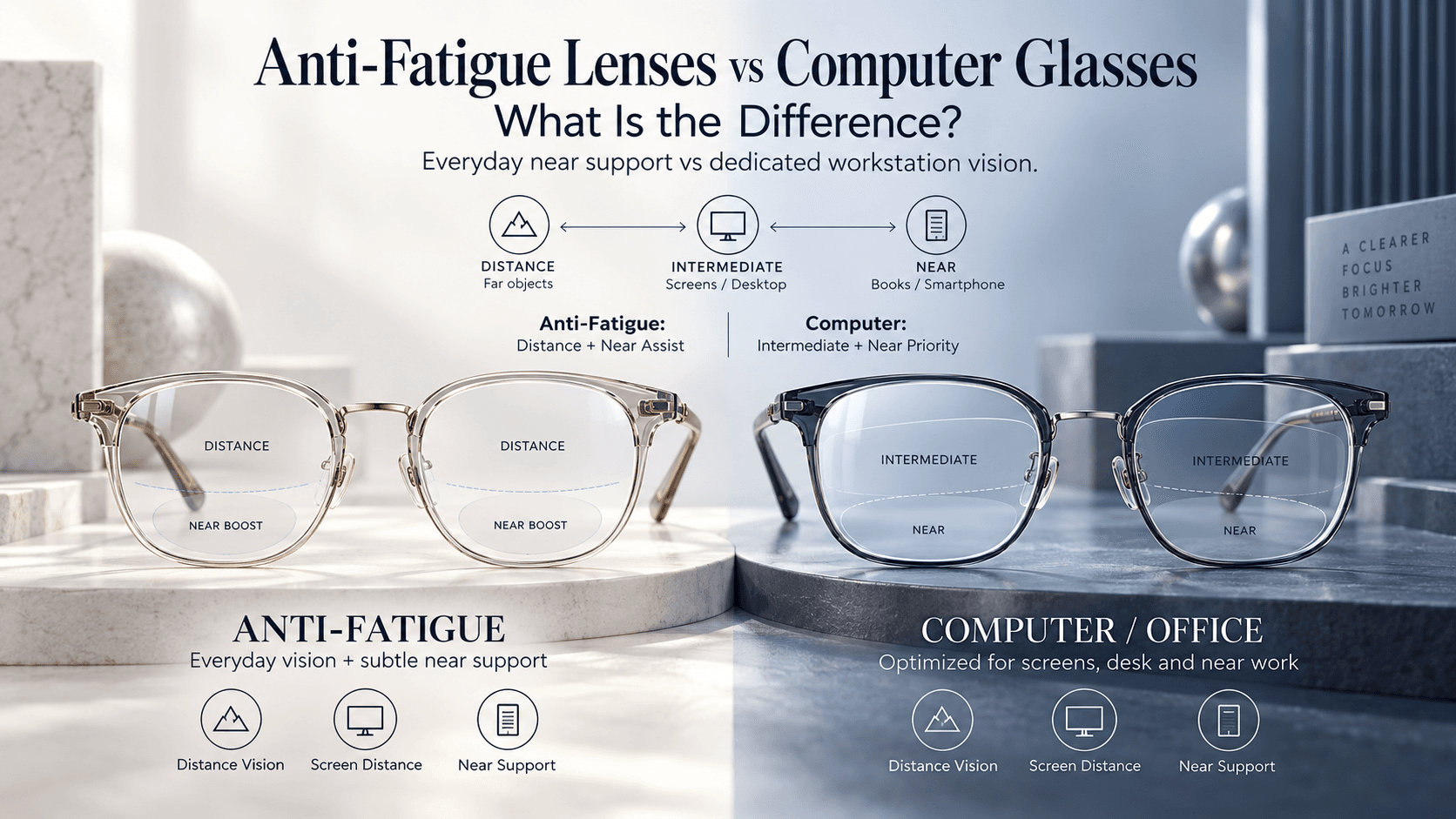
Anti-fatigue lenses are typically designed as everyday lenses with a small amount of additional near focusing support toward the bottom of the lens. Computer glasses, particularly occupational or office lenses, are usually optimized more specifically for the distances used at a desk—from reading distance through computer-screen and sometimes room distance.
ZEISS describes anti-fatigue or digital lenses as single-vision-style lenses with a small “boost” in the lower part of the lens, while office lenses are designed around near-to-intermediate working distances.
Understanding that difference makes choosing between them much easier.
What Are Anti-Fatigue Lenses?
Anti-fatigue lenses are sometimes called:
digital lenses
accommodative-support lenses
enhanced single-vision lenses
near-boost lenses
The exact design varies between manufacturers.
The basic concept is relatively simple.
Most of the lens works like your normal distance prescription.
Toward the lower portion of the lens, however, the power changes slightly to provide additional support for close-up activities such as:
reading messages
checking your phone
looking at documents
studying
light laptop use
ZEISS describes digital or anti-fatigue lenses as single-vision lenses containing a boost at the bottom, particularly for people beginning to experience near-work strain but who do not yet require full progressive lenses.
Who Might Consider Anti-Fatigue Lenses?
They are often discussed for younger or early-presbyopic adults who:
see clearly at distance
still have useful natural focusing ability
perform a lot of close work
feel tired after prolonged reading or screen use
want glasses that remain practical outside the office
For example, imagine someone who drives to work, attends meetings, uses a laptop, checks their phone and then goes shopping afterward.
They may want one everyday pair rather than changing glasses whenever they leave their desk.
That is where the general-purpose nature of anti-fatigue lenses can be attractive.
When choosing an everyday frame, you can also explore eyeglasses at Rimloo and consider comfort, frame dimensions and compatibility with your prescribed lens design.
What Are Computer Glasses?
“Computer glasses” is a broader term.
It may refer to simple prescription glasses optimized for a fixed computer distance, but it can also refer to more sophisticated occupational or office lenses.
Office lenses are specifically designed around the distances people use indoors.
These typically include:
Near: books, papers and smartphones.
Intermediate: laptop and desktop monitors.
Room distance: colleagues, customers or objects several metres away.
ZEISS office lenses, for example, are designed to provide clear vision from reading distance through different intermediate distances depending on the selected design.
HOYA similarly describes computer/work lenses as occupational solutions designed for near and intermediate visual tasks.
Why Can Computer Glasses Feel Better at a Desk?
General-purpose progressive lenses need to divide their lens area among:
distance
intermediate
near
Computer glasses can devote much more of the lens to near and intermediate viewing, because long-distance vision is less important for that particular pair.
That can produce wider useful zones for:
monitors
keyboards
documents
multiple screens
ZEISS notes that office lenses can provide larger near and intermediate areas than general-purpose progressive designs because they are optimized specifically for working distances.
This may also help posture.
If your intermediate viewing zone is too narrow, you may unconsciously:
lift your chin
lean toward the monitor
tilt your head
move your neck repeatedly
Office lenses are designed to help provide more natural visual access to the desk environment.
Anti-Fatigue Lenses vs Computer Glasses: Quick Comparison

The Biggest Difference Is Viewing Distance
Think of the two lens types this way:
Anti-fatigue lenses
Distance first → small amount of near support
Computer glasses
Workstation first → optimized near/intermediate vision
This distinction is more useful than thinking of one as “stronger” or “better.”
Consider your actual working environment.
Do you spend eight hours seated approximately 60–80 cm from a monitor?
Computer-specific lenses may make more sense.
Do you spend your day moving between the screen, meetings, walking, distance viewing and phone use?
Anti-fatigue lenses may offer greater everyday versatility.
Are Computer Glasses Just Blue-Light Glasses?
No.
This is an important distinction.
A computer lens is primarily defined by its optical prescription and viewing-distance design, not by whether it contains a blue-light filter.
You can have:
prescription computer glasses without a special blue-light filter
general-purpose glasses with a blue-light coating
occupational lenses with additional coatings
non-prescription blue-light-filtering glasses
These are not the same product.
Computer glasses are meant to help address the visual demands of the workstation.
Blue-light filtering is a separate lens feature.
What About Regular Progressive Lenses?
Progressive lenses already contain:
distance
intermediate
near zones
So why would a progressive wearer need computer glasses?
Because the intermediate portion of a general-purpose progressive lens may be narrower than what someone wants for hours of monitor use.
ZEISS notes that conventional progressive designs can require users to adjust their head position to access intermediate vision during office tasks.
A dedicated office pair can therefore complement—not necessarily replace—everyday progressive glasses.
One pair can be used for:
driving + walking + general daily life
while another is used for:
computer + desk + reading + office
Do Anti-Fatigue Lenses Prevent Digital Eye Strain?
They may reduce focusing demand for some people, but they should not be treated as a complete cure for digital eye strain.
Screen-related discomfort can also involve:
reduced blinking
dry eyes
glare
poor posture
incorrect viewing distance
uncorrected refractive error
excessively long near-work sessions
If you are constantly experiencing screen-related discomfort, an eye examination is useful because refractive errors can contribute to symptoms. ZEISS also recommends having vision assessed when digital eye strain persists.
Lens choice is only one part of comfortable screen use.
Which Should You Choose?
Anti-Fatigue Lenses May Make More Sense If:
you still need excellent distance vision throughout your day
close work causes mild fatigue
you frequently switch between distance and near
you want one everyday pair
you are not yet ready for full progressive lenses
Computer Glasses May Make More Sense If:
you work at a screen for several hours daily
your monitor is your primary visual task
regular progressives feel restrictive at intermediate distance
you experience neck strain while finding the correct lens zone
you regularly work between documents, monitors and other objects within a room
You can browse eyewear at Rimloo when selecting a frame, but the final lens design and powers should be chosen according to your prescription and actual working distances.
Measure Your Real Workstation Before Choosing
One surprisingly useful thing to do before an eye appointment is measure:
eye-to-phone distance
eye-to-laptop distance
desktop monitor distance
maximum distance you need to see clearly around the room
Computer lens designs can be customized around working distances, so this information can help your optician understand what you actually need. ZEISS, for example, offers office-lens designs optimized for different maximum intermediate distances.
Saying “I work on a computer” is useful.
Saying “my main screen is 75 cm away and I need to see colleagues three metres away” is much better.
The Bottom Line
Anti-fatigue lenses and computer glasses overlap—but they are not identical.
Anti-fatigue lenses are generally everyday lenses with a small near-support area designed to reduce some of the focusing demand associated with close work.
Computer glasses are usually more specialized, devoting more of the lens to the near and intermediate distances that dominate desk work.
Neither is universally better.
The best option depends on where you spend your visual day.
If your routine is:
road → office → phone → meetings → outside
an anti-fatigue design may provide useful flexibility.
If your routine is:
monitor → documents → second monitor → desk → room
dedicated computer or occupational lenses may provide a more comfortable workspace.
The most effective lens isn't simply the one labeled “digital.”
It is the one designed around your prescription, your working distances and how you actually use your eyes.
